A short, intense window of AI agent use — video, home tech, meta-evaluation, plus nine major wins: the SmarTekAI brand site live with HTTPS at smartekai.net, a self-hosted email migration with failure triage and auth hardening, a scheduled astrophotography posting pipeline, an on-device Korean conversation translator, a neutral, same-rules public-disclosure data pipeline, a live plate-solved dashboard for three smart telescopes, a clean agent-to-agent handoff of router work, a branded Android TV app built overnight, and a small-business web store rebuilt with PayPal checkout — distilled into patterns you can actually use.
Built from Grok Bot main-agent logs (12 specialists, ~6.6k transcript lines, 2026-08-31 → 2026-09-06 UTC), plus curated external titles. Live at smartekai.net. Private material stays private.
Distinct jobs, measured receipts, public-safe stories — the live HTTPS brand site, self-hosted mail ops, a social posting pipeline, an on-device translator, a public-data disclosure pipeline, a live plate-solved telescope dashboard, proper agent-to-agent delegation, and an Android TV app shipped overnight, and a small-business web store rebuilt in an evening.
A specialist agent named Website Builder rebuilt the site of a small magazine-subscription business on the site owner’s own Windows / ColdFusion server. The owner had no backend access to the old site. The agent started with a read-only survey of the target server (~5:20 PM CT) and changed nothing. It copied only what any visitor can see of the old site, and it turned a catalog that existed only as a PDF price list into structured data covering hundreds of titles. Next it rebuilt the site in CFML in its own sandbox, matching the original look, with a proper order picker and fixed prices instead of free-typed ones. All 38 local tests passed. In about 5 hours, the owner went from no backend access to a working test-mode store with PayPal checkout, an orders admin and catalog tools.
~5h
First look → working test store
22/22
Checkout server tests
1×
Test purchase charged exactly once
0
Existing sites changed
~2m
Outage (fixed right away)
How it went (CT):
~6:08 PM: the agent asked the owner before any server change. With her OK, it backed up the web server config and added the new site in its own folder, app pool and database, with its own limited database login. Existing sites were left untouched.
~8:50 PM: PayPal checkout in sandbox (test) mode passed 22/22 server tests: correct amounts, cancel works, and a refresh can’t charge twice. Honest friction: a naming clash with ColdFusion 2025 took the order page down for about two minutes, and the agent fixed it right away.
~9:00 PM: the owner made a test purchase, and the agent verified it was recorded as paid and captured exactly once.
~9:15 PM: it built a password-protected orders admin (search, filter, full details, mark processed or fulfilled with notes, spreadsheet export), plus order emails that switch on only at go-live.
The admin uses a separate least-privilege database login that cannot delete anything, which the owner approved.
The owner set her password through a secure field the agent never sees.
While verifying, the agent found and fixed a bug that would have rejected every password on the server.
HTTPS: the server’s certificate tool allows automation only in its paid edition, so the agent stopped rather than work around the license. It gave the owner four steps, and she added the certificate herself in about two minutes (~9:57 PM). The agent verified that only the new site changed and that auto-renew is on.
~10:00 PM: it registered PayPal’s payment-confirmation webhook with signature checking, and forged test messages were all rejected.
~10:25 PM: at the owner’s request, it added catalog management to the admin: add, edit, hide and unhide titles, delete only titles that were never ordered, and a change history. It then verified the catalog was byte-for-byte unchanged.
Why it counts: the agent asked before every change on a production server and used least-privilege logins. It stopped at a license boundary instead of working around it, verified every step, and was honest about the two-minute outage. And the owner can now run her catalog herself. Status: still in test mode. Going live waits on live PayPal credentials and on confirming that order emails are delivered.
Astro TV v1.1 full screen on the bedroom Fire TV Stick (night of 2026-10-06/07, CT), and its launcher tile with the SmarTekAI logo. Click for full size.
The operator wanted the Live Stacks dashboard on the TVs, driven with a TV remote. Telescope Controller is the specialist that took over all telescope work that same night. It built Astro TV, a lightweight full-screen Android TV app that opens the Live Stacks dashboard served from the home PC. D-pad buttons pass straight to the page. The app has a proper TV launcher banner, a branded loading screen (“Connecting to the telescopes…”) and an offline screen that retries every 15 seconds if the PC is off. Because the app just loads the dashboard, any viewer improvement shows up on every TV without reinstalling.
2
TVs running it (3rd next)
~1h
First install → second TV
~12m
v1 → v1.1 with logo
15s
Offline auto-retry
0
Reinstalls for viewer updates
How it went: v1 went onto the bedroom Fire TV Stick ~12:34 AM CT. The operator then set a new rule: every app built must include the SmarTekAI logo. By ~12:46 AM CT, v1.1 shipped with the official logo on the tile, loading and offline screens. It was signed with the same key, verified and installed over v1, and the viewer loaded full screen showing live stacks (Dwarf III on M16 Eagle Nebula, Seestar S50 on NGC 6946 Fireworks Galaxy). The agent also gave the operator a window on the PC monitor to see and control the Fire TV. After the operator reported lag and flaky arrow keys, it retuned the stream: lighter video, and the keyboard presented as a real hardware keyboard. The living-room Philips Android TV had no network debugging, so the agent used the TV’s remote-control pairing from the PC to open the Play Store page for a sideloading app right on the TV, and the operator pressed Install. Honest friction: that sideloader was ad-heavy and once hung mid-install, which needed a restart. Astro TV was working on the living-room TV by ~1:25 AM CT. That makes two TVs in about an hour from first install, with the guest room next.
Why it counts: an agent shipped a real, signed, branded app to real hardware overnight. It adapted to each TV’s limits, followed the owner’s new brand rule on the very next build, and was candid about friction. Patterns only; no network addresses, device names or install paths.
While building Live Stacks, the Computer Optimization agent needed fixed network addresses for three smart telescopes (Dwarf III, Seestar S50, Dwarf II) and the home PC that hosts the TV viewer, so the dashboard wouldn’t break when DHCP handed out new addresses. Router work isn’t its lane: the router belongs to the wifi optimizer agent, and router changes need the operator’s OK. After the operator approved it (~8:49 PM CT), Computer Optimization handed the job over with a clear brief: router-side address reservations only, pin each device to the address it already had, never change the telescopes themselves (they stay on automatic DHCP), no router reboot and no Wi-Fi/radio changes because all three scopes were imaging, and check with the operator before saving anything that could drop the connection. It added the PC as a fourth item ~8:54 PM CT, under the same rules.
4
Address reservations (3 scopes + PC)
~11m
Handoff to done
2
Human OKs asked first
0
Reboots or Wi-Fi changes
0
Dropped connections
What the receiver did: wifi optimizer did not treat another agent’s relay as authorization by itself. It first ran a read-only check that every device was online where expected, then asked the operator directly, warning that saving could cause a brief Wi-Fi blip mid-imaging. With a go (~8:55 PM CT), it added all four reservations through the router’s normal admin login (no workarounds), verified the reservation table, and confirmed all four devices stayed online. Imaging was never interrupted. It was done ~9:00 PM CT, about 11 minutes after the handoff, and it reported back to the operator and sent Computer Optimization an FYI. Later that night Computer Optimization also handed the whole telescope lane to a new Telescope Controller agent, with written rules.
Why it counts: specialists stay in their lane. The request carried the scope and the guardrails, and the receiver checked the facts and confirmed with the human before a risky change. The result was verified and reported back to both the human and the requesting agent. Patterns only; no network addresses, device names or router details.
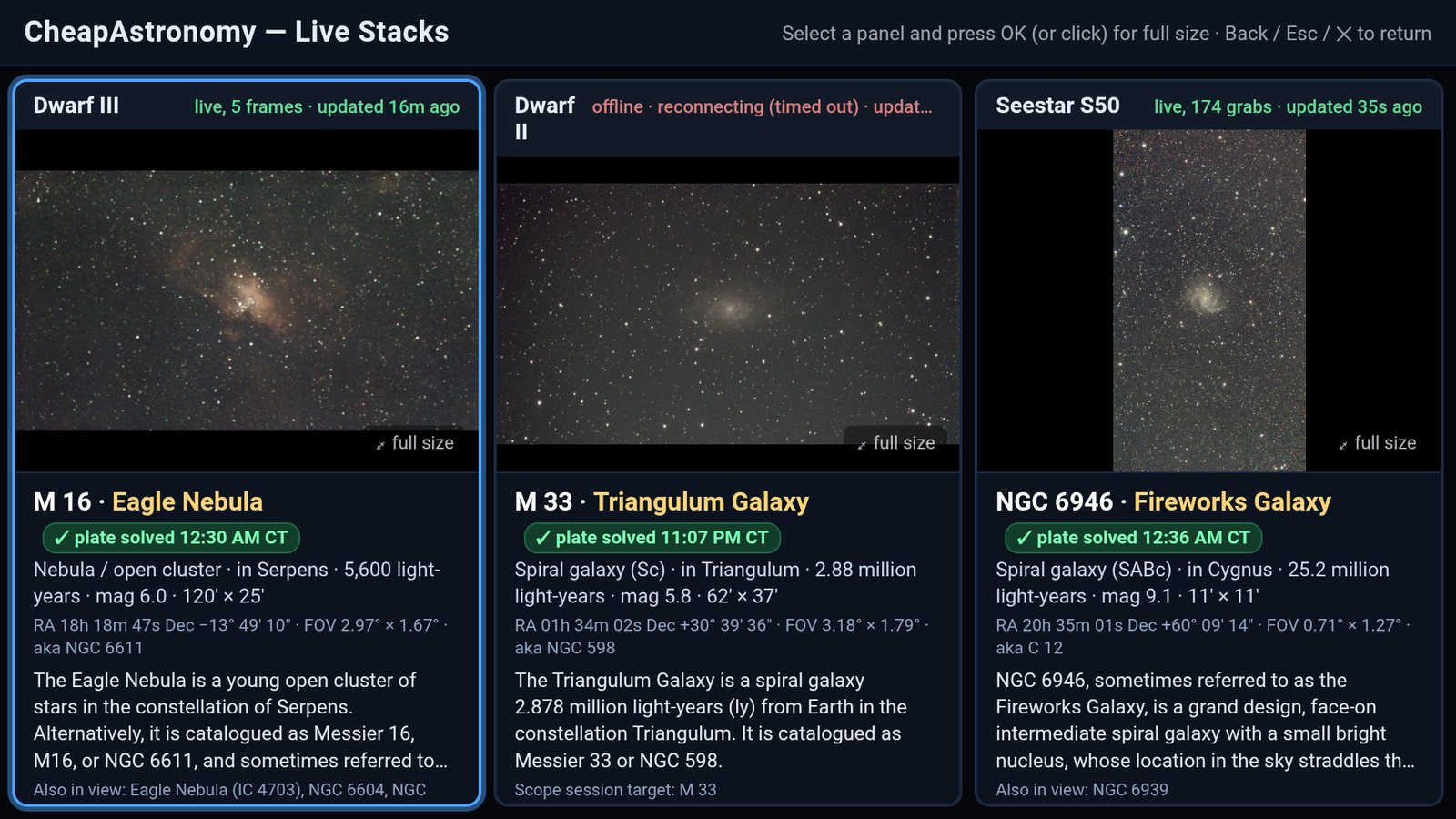
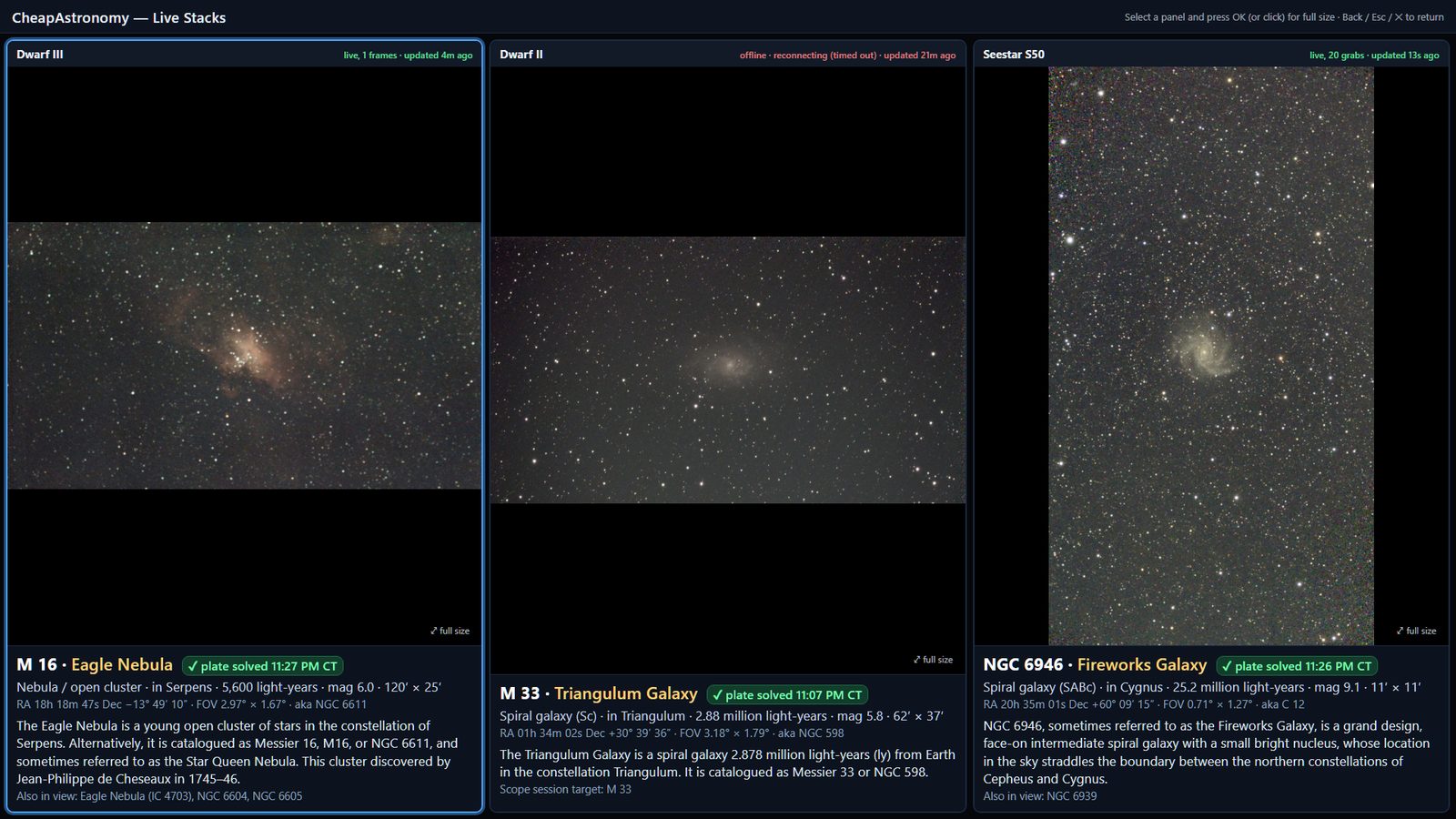
The dashboard on the night of 2026-10-06 (CT). Click for full size.
The fleet’s Computer Optimization agent built CheapAstronomy — Live Stacks, a local web dashboard made for the living-room TV. Three side-by-side panels — Dwarf III, Dwarf II and Seestar S50 — show each smart telescope’s latest live stacked frame and its connection status. Every frame is plate-solved automatically (RA/Dec, field of view, rotation, pixel scale), then the target is identified with catalog IDs, type, constellation, distance, size, magnitude, a short Wikipedia-sourced description, and the other objects also in view. On 2026-10-06 it named all three targets on its own: M 16 Eagle Nebula, M 33 Triangulum Galaxy (matching the scope’s own session target) and NGC 6946 Fireworks Galaxy.
3
Smart telescopes, one screen
~0.5s
Plate solve per frame
3/3
Targets identified 10/06
RO
Read-only scope access
2.0.2
Dashboard version
Why it counts: agents turned hobby smart-telescope gear into a usable observatory display. The fiddly astronomy — plate solving, catalog lookup, “what am I actually looking at?” — happens automatically, so the answer is on the TV before anyone asks. It is built for a remote: select a panel and press OK (or click) for a full-resolution view, Back / Esc to return, arrow keys to switch scopes, with clear focus rings. Status stays honest — a scope that drops off shows “offline · reconnecting” and how long ago it last updated instead of pretending to be live. Patterns only; no network addresses, no device IDs.
A specialist agent named Politics is Good Business turned public House and Senate financial-disclosure filings into 747 per-member HTML and PDF reports plus comparison tables — fully automated, one method for every member, no editorializing. Reliability flags are shown, not hidden; scanned filings are decoded only when they pass explicit validation gates; a methodology page and a disclosure footer ship with the data. No ads, no donations, no trackers. Status: the reports and rankings are built; the public site is now live at politicsisgood.biz.
747
HTML + PDF member reports
480
Ranked (112 limited · 155 insufficient)
727
Net-worth ranges (20 not available)
550
Reliability-filtered recommended list
744
Public-domain portraits
Why it counts: the product is the trust layer. Same rules for every member; value ranges carried as Low / Mid / High; scanned and checkbox-style filings used only when two independent readers agree and the filing clears validation (otherwise labelled “not used”); honest limitations printed in every report. Patterns and outcomes only — no individuals, no per-person figures here.
On 2026-09-06 Scott registered smartekai.net at Enom, pointed A/CNAME DNS at Liquid Web Ubuntu, and the AI Analysis agent deployed the static analysis site to /var/www/html via nginx with Let's Encrypt HTTPS for apex + www (auto-renew). Live at https://smartekai.net and https://www.smartekai.net.
2
Live HTTPS URLs
4
Loop steps
LE
Let's Encrypt TLS
12/05
Cert expires 2026
↻
Auto-renew on
Why it counts: this is the meta win — shipping the public lab itself after Email Migration, Astro Poster, and Korean translator were already featured. Domain → DNS → static publish → TLS, kept simple. Patterns only; no SSH keys or registrar secrets.
A specialist agent named Email Migration moved business mail onto a self-hosted stack, triaged Sync Issues / Local Failures folders (632 customer messages restored to Inbox across two mailboxes), then on 2026-09-06 cleared ~6,700 forged-sender backscatter bounces from one Inbox down to ~586, added content filters, and verified SPF + DKIM + DMARC quarantine.
673
JSONL lines
43
Real user turns
271
Tool messages
632
Msgs restored (Local Failures)
#3
Fleet rank by size
Why it counts: migration is not “done” at first sync. Recovering stranded customer mail, scrubbing a spoofing-driven bounce flood, and finishing domain auth are the outcomes that make a self-hosted cutover usable. Patterns only; no passwords, no address lists, no raw mail.
A specialist agent named Astro Poster scanned a local astrophotography library, drafted captions, queued human approvals, and published on a morning / noon / evening cadence across X and Facebook — with a used-image ledger so finished frames are not reused.
1,652
JSONL lines
56
Real user turns
692
Tool messages
12
Images fully posted
#1
Fleet rank by size
Why it counts: five scheduled automations (6am / noon / 6pm + catch-ups) turned drafting into a desk. When social APIs could not attach photos, the agent switched to browser posting instead of stalling. Patterns only; no personal profile URLs, no raw chats.
A specialist agent named Korean translator built and iteratively installed a SmarTekAI-branded Android translator for conversational Korean↔English: speech in, dual-language display, headset playback — with a bias toward setups that stay useful when connectivity is limited. Once tasked, the agent could largely test and iterate without the operator in every cycle: compile → install on a USB-connected phone → field-test → fix, including unsupervised cook loops against a fixed public video fixture.
476
JSONL lines
37
Real user turns
190
Tool messages
6
Build / install cycles
#6
Fleet rank by size
Why it counts: the operator asked whether the agent could build and push an APK to a USB-connected phone the way a desktop agent can, then supplied a public Korean/English conversation video as a repeatable test fixture so they were not the bottleneck every pass. Across 6 logged compile → install → field-test → fix cycles, the specialist ran unsupervised cook loops — play the clip from the PC, observe the phone app over USB, read logs, rebuild/reinstall, retest — and the operator confirmed they did not need further manual steps and could let the agent cook. Framing already on site: hands-off APK push + each loop improved the product; paid apps never worked as well for them. Patterns only; no raw chats, no device IDs, no personal video URLs.
“Vibe coding” means asking one AI chat for code, pasting in whatever comes back, and hoping it works. This article explains what we do instead: a crew of specialist AI agents, each with one job, clear limits and a human in charge. It covers how that differs on scope, accountability, guardrails, verification and continuity, and why dividing the work makes people more capable.
SmarTekAI is a public lab notebook — now live at smartekai.net — for how AI agents behave when they are given real jobs: run a scheduled astrophotography posting desk, storyboard local video, ship a Korean conversation translator, tune a TV, clean up a PC, migrate mail, publish the brand site, and supervise other bots when they stall.
We publish patterns, counts, and takeaways — not passwords, not private chats, and not anyone’s family or legal life. One private case study from another vendor is noted as withheld on purpose. Work often overlaps astronomy media and practical home/self-host tech; personal ops stay off this site. Each fleet agent also has a downloadable white paper with public-safe metrics.
Instead of one endless thread, work was split into named agents. Volume clustered in creative production and practical home/self-host tasks.
Loading fleet…
Site publishEmail MigrationAstro PosterKorean translatorPolitics is Good BusinessVideoAstro postingTV/AVWi-FiPC cleanupCurationAnalysisPlayOrchestrationDisk